
Screenshots
About Digital Clock Live Wallpaper-7
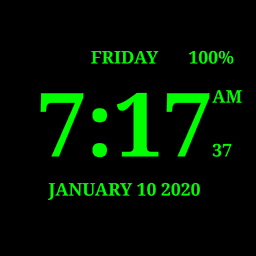
Digital Clock Live Wallpaper-7 is a versatile digital clock app that transforms how you stay connected to time throughout your day. Whether you need a quick glance at the current time, date, month, year, day of the week, or battery charge, this app delivers all the information you need in a customizable, always-visible format.
Experience time awareness through multiple viewing modes tailored to your lifestyle. Use the digital clock as a live wallpaper with adjustable size and position, as a home screen widget showing seconds, or in full-screen mode with the screen staying on. The app's talking clock feature announces the current time and scheduled text notifications by voice—perfect for keeping you informed during work and leisure without looking at your screen. Simply double-tap the app window or live wallpaper to hear the time spoken aloud, and benefit from voice reminders that announce custom messages on your schedule.
Choose from over ten font styles, including digital, LCD, and pixel designs, to match your personal aesthetic. Customize the primary color, add visual depth with glow effects, 3D enhancements, and shadows, and adjust secondary font sizes for date and seconds display. Select backgrounds from your gallery to create a truly personalized look that reflects your style. The app supports both short and long date formats, recognizes all time formats and languages, and adapts seamlessly to portrait and landscape orientations across all screen resolutions, including HD and 4K displays.
Protect your device with Night Clock mode—a battery-saving night mode featuring a black background and dark-gray text that minimizes power consumption. The Always on Screen feature keeps the time visible even when your device is off, with brightness adjustment and auto-lock options to fine-tune performance. The random position change feature, updating every minute, prevents screen burn-in while you enjoy your digital clock display.
For charging moments, the app offers an elegant analog clock screensaver mode. All customization options work flawlessly in fullscreen mode, live wallpaper view, and screensaver settings, giving you flexibility wherever you choose to display your time. Digital Clock Live Wallpaper-7 combines functionality with style, delivering a complete clock solution that adapts to your needs.
Pros & Cons
Pros
- Multiple display modes: live wallpaper, widget, fullscreen, and screensaver
- Talking clock announces time by voice on demand or schedule
- Extensive customization with ten font styles, colors, glow, and 3D effects
- Night Clock mode reduces battery drain with dark background design
- Screen burn-in protection via random position changes every minute
Cons
- Always-on-screen feature may drain battery despite Night Clock option
- Requires permissions for live wallpaper, widget, and voice features
- Voice announcement quality and language support depend on device settings
- Customization complexity may overwhelm users seeking a simple clock display
Related Apps

AlienGUIse
Desktop themes and manager for Windows — transform your system with 5 futuristic designs.

SharpKeys
Remap keyboard keys to launch apps, media controls, and custom commands on Windows.

RocketDock
Desktop launcher for Windows — quick access dock with customizable icons and positioning.

Custom Resolution Utility (CRU)
Display resolution utility: Create custom resolutions for your monitor with precise refresh rate control.

Lagguy Wallpapers
Lagguy
4K & HD wallpapers for Android — minimal, abstract, nature, AMOLED designs with lifetime access

Lock Screen OS
Apps Genz
Customize your lock screen with widgets, photos, and notifications. Replace Android's default lock screen.
Latest Articles

Play a free Color Ball Sort Puzzle-style game in your browser (no download)
Oct 6, 2026

Play a free Beach Buggy Racing-style kart racer in your browser (no download)
Oct 6, 2026

Play a free Alto's Adventure-style game in your browser (no download)
Oct 6, 2026

Free online whiteboard like Jamboard: use Quickboard in your browser, no signup
Oct 6, 2026

Free online running pace calculator: splits, race predictor and daily challenge, no download
Oct 6, 2026